
Google Analytics 4 Communication Strategies for Marketing Agencies
Written By: Shane Clark on April 27, 2022
With the release of GA4 (Google Analytics 4) and Google warning of a planned complete data loss by October of 2023, many marketing agencies have a great deal of concern. According to W3Techs “Google Analytics is used by 85.8% of all the websites whose traffic analysis tool we know. This is 55.3% of all websites.” With a proper planning and communication strategy, there are opportunities for more work while helping the agency’s end clients more logically track their data.
Learning Google Analytics 4 Features
I feel very strongly that the person in direct communication with the “end client” should have a high-level awareness of the features provided by GA4. This person should also have an understanding from a marketing perspective what features are available. I have listed some essential concepts for the person(s) who are in direct communication with the client to understand.
- Event handling in GA4
- User acquisitions model
- Enhanced reporting capabilities in GA4
- General changes to the dashboard in GA4
- Audience integration with Google Ads.
- Predictive analytics features in GA4
- Audience Segments
Udemy offers a course I recommend to all my agency clients. The name of the course is Master Google Analytics 4 Reports and GTM Basics in 2022. I find this course at times a bit advanced but goes over what new available features are essential.
Be Proactive with Your Communication
Do not wait for your client to contact you about an upcoming data loss due to Universal Analytics going away. You should contact any clients for whom you are responsible for analytical data tracking. Also contact clients for whom you do website management. Let them know you have a plan for a painless update. I have added a sample email I have sent to my clients whose Google analytics I manage:
Client Name,
The method for tracking your website data is Google Universal Analytics (UA). Google will discontinue UA next year. The replacement web-based software is Google Analytics 4. Google has stated that UA will no longer be tracking data by next year. We at _________ (agency name) have a migration plan in place and would like to discuss planning and costs.
Thanks,
Shane
I try to keep the client messaging as generic as possible as each client will have unique data tracking requirements. I then can edit/add any additional information related to the client’s specific case.
Mapping of the Business Goals Before Planning the GA4 Migration
To utilize the advanced features of GA4 it is essential to understand your client’s business goals. In so many cases with UA, I find the views are set up along with a few conversion goals, which is the end of the effort. GA4 is built on understanding the user’s journey, but to understand that journey, it is important to know the business model goals your client is trying to achieve.
Planning for the Cost / Price of a GA4 Migration
Giving an accurate cost for a GA4 migration in a generic way is a little tricky. Each client will have their own data tracking needs, and before you can plan on strategy and costs, you need to answer a few questions. I have listed the questions I look at per website/app I am tracking below.
- What is the data currently being tracked?
- What opportunities does GA4 provide for enhanced data analysis?
- How much does the client have available in the budget?
- How much traffic does the client website/app have?
- Client’s level of technical knowledge and involvement?
Those questions are a good starting point to approach your client with a plan and also a cost for a GA4 migration. In most cases, you should be able to provide your client with multiple options.
While I do not believe in a set package for client pricing, general cost modeling can be done based on the client’s needs.
Sample scenarios to get a basic idea of what the client will require
– Basic GA4 setup without Google Tag Manager (GTM) setup
– Basic GA4 setup with GTM setup (up to 10 conversion goals)
– GA4 setup with GTM setup (up to 10 conversion goals) + custom reporting (6 reports)
– Basic GA4 setup with GTM setup (up to 10 conversion goals) + custom reporting (6 reports) + Data Studio reports (4-6 reports)
– Basic GA4 setup with GTM setup (up to 10 conversion goals) + custom reporting (6 reports) + Data Studio reports (4-6 reports) + customized events / funnel reports
As you can see from my above list, you will need to allow for flexibility based on the needs of the website and the budget of your client. How an agency categorizes its packages will depend on the type of client, nature of the app/website, and also the budget. Because of the number of moving parts, the “one size fits all model” could mean lost opportunities for both the agency and the client.
Installing and Running GA4 for Data Collection
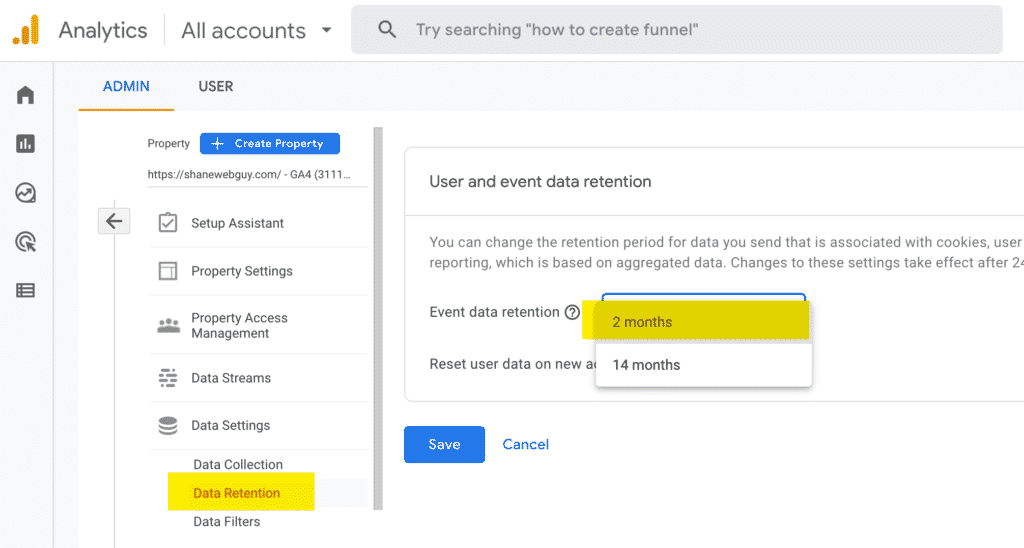
Universal Analytics / Google Analytics 4 can be run in parallel. At the very least, you should get GA4 installed to begin data collection to buy time for the planning and implementation of a full-blown implementation. Remember that Google sets the data retention length to 2 months by default. You will want to change that to a maximum of 14 months.
Setting Up a Process for Information Gathering
The time it takes for a successful GA4 implementation will depend on your ability to accurately and efficiently collect the information you need. One area I see that gets lost in communication is the definition of a conversion goal. If you go to my about page, you will see I have my resume located on the page for download. I consider a download a conversion. If anyone but myself were implementing the conversion goals, they would most likely overlook this.
I recommend creating a form ready to gather the information you need to query the client on what you will include in the setup. I have provided a base template I use to start with as I gather the required information.
Email Used:
Permissions Needed:
Google Tag Manager – Publish
Google Analytics – Editor
Account Type: (New / Existing): Existing
Account Setup Notes: Currently has UA properties set up
General Instructions: Evaluate current GTM setup , hook up GA4 with GTM and also verify conversions are working under both UA / GA4
Conversion Goal Tracking:
Page Name:
Page URL:
Listed Goals/ Events:
Conclusion
I feel that the GA4 opportunities outweigh the negatives. GA4 offers rich data collection and also user acquisition features that can benefit your clients. It is important to plan and coordinate these options to your agency’s client base before the UA shutdown in July 2023. If you are looking to develop a GA4 migration strategy or need general help with SEO or Google Ads, don’t hesitate to contact me.
